


DFRobot
DFRobot Fermion TEL0148 Serial Data Logger V2.0 for Arduino
DFRobot Fermion TEL0148 Serial Data Logger V2.0 for Arduino
SKU:IN000378
Earn an estimated 6 points on this order
Found a better price?
Send the competitor link and price to our team. No automatic price match.
Couldn't load pickup availability
- For Bulk Order Click Here
- Need Customer Support?
- Free Delivery Above 999/-
Note: In case you receive a damaged or faulty product, please return it in the original box with all foam and packaging. Returns will not be accepted if further damage occurs due to improper packing.
If you order a product that is currently in Preorder, and the price of that item increases in the future, you will be required to pay the difference in price.
For refund/return/replacement, call us at +91 95995 94520 or email us at support@rees52.com
Delivery Time
Delivery Time
- Delivery time with the Express Shipping option is 2-3 working days, and with the Standard Shipping option is 5-6 working days. It varies based on location, reliant on courier services.
- Delivery time if the order item is on Preorder Status is 15-20 working days.
COD (Cash on Delivery)
COD (Cash on Delivery)
Cash on Delivery is currently unavailable for new orders
Existing COD Orders Only
- For COD you have to pay extra charges of Rs 350/- before the shipment. (We will share the company QR Code, UPI ID or Account details for the same)
The REES52 Promise
The REES52 Promise
We want you to build, not worry. Here is exactly what happens if something goes wrong with your order.
Dead on arrival or defective? We replace it.
If your item is dead on arrival or has a manufacturing defect, tell us within 7 days of delivery. Email support@rees52.com with your order number and a short video or a couple of photos showing the problem. Our team will get back to you within 24 hours and arrange a free pickup from your doorstep - you never pay return shipping for a defective item. Once we verify the issue, your replacement ships out right away. If the item is out of stock, you get a full refund instead.
Refunds, with real timelines.
- Approved refunds go back to your original payment method within 6-7 working days.
- Missing item in your package? Tell us within 7 days with photos of what arrived and the parcel label. Once confirmed, the refund for the missing item reaches you in 2-3 working days - or we ship the missing piece free, your choice.
- Every refund comes with a reference number by email or WhatsApp, so you can track it with your bank instead of chasing us.
Wrong item or not as described?
Email us your order number and a photo of what you received. We arrange the return pickup, and ship the correct item as soon as the return is on its way. Prefer your money back instead? That is fine too - full refund, same 6-7 working day timeline.
About lead times on some products.
A few items on rees52.com are sourced from our overseas partner warehouses and are not sitting on our shelf. Those products show a lead time of about 20-25 working days on the product page, before you pay. If you order one, we keep you posted as it moves. Changed your mind while waiting? You can cancel any time before dispatch and get a full refund within 6-7 working days. No cancellation fee, no questions.
Talk to a human.
Email support@rees52.com or call/WhatsApp +91 95995 94520, Monday to Saturday, 10:30 AM to 7:00 PM. Real people, order number in hand, actual answers.


The DFRobot Fermion TEL0148 V2.0 records text sent by a microcontroller UART to a microSD/TF card. It is a separate product from the Gravity TEL0147 logger with built-in flash and from a basic SPI microSD breakout.
Features
- UART data recording with configurable baud rate, without a microSD library on the sending controller.
- FAT32 microSD/TF card support up to 32GB. Card compatibility is not guaranteed for every card.
- TXT and CSV file formats, scheduled file creation and a SAVE control pin.
- Onboard status LEDs for checking data-write activity.
- USB connection for accessing stored files on a computer without a separate card reader.
Specifications
| Manufacturer / model | DFRobot / TEL0148, V2.0 |
| Supply voltage | 3.3-5V DC |
| Operating current | 10mA |
| Storage | microSD/TF card, FAT32, up to 32GB; not included |
| USB protocol | USB 2.0 |
| Operating temperature | -20 to 65 degrees C |
| Operating humidity | 5-85% RH |
| Board size | 23 x 29mm |
Getting started
Use a compatible FAT32 card and match the module baud rate to the sending UART. Follow the official configuration guide before recording. The module generates CONFIG.TXT after initial UART power-up; its settings select baud rate, file number, TXT/CSV format and timed file creation. Back up existing files before changing file numbers because an existing filename can be overwritten.
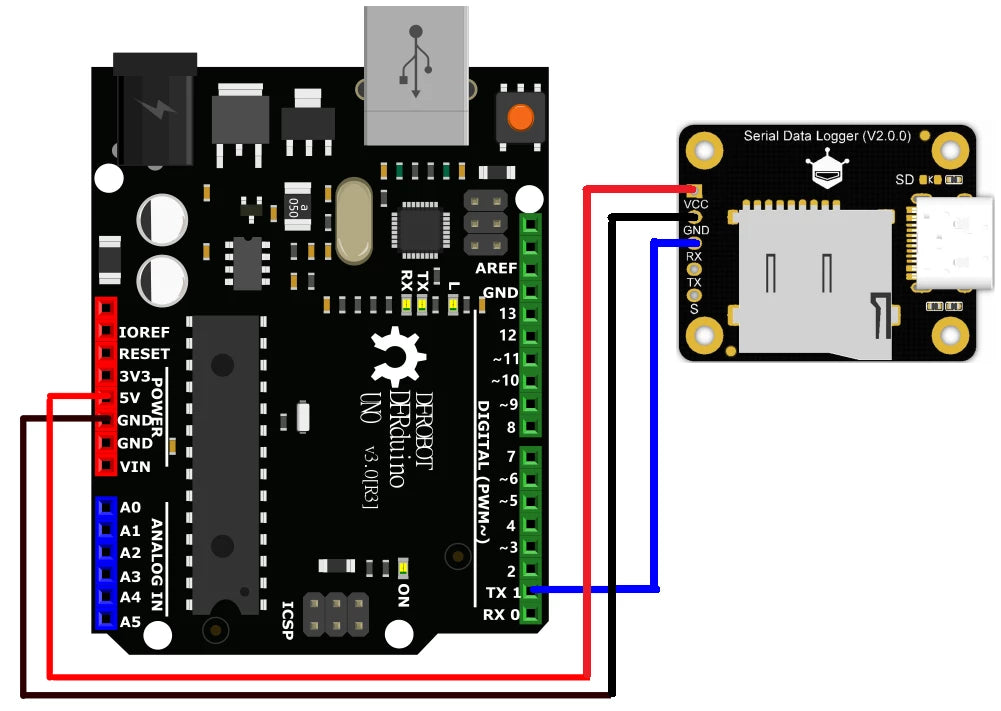
The SAVE input creates separate files as shown in the official example. Allow the module to finish starting before transmitting data and avoid disconnecting power while writing. USB file-access mode and UART recording mode are different operating modes; follow the manufacturer's instructions when switching. Connect the correct supply and ground, verify RX/TX wiring and do not apply RS232 voltage levels directly.
Package Includes
- 1 x DFRobot Fermion TEL0148 Serial Data Logger V2.0 module.
- 1 x 2.54mm 10-pin black single-row header, supplied separately for soldering.
microSD card, USB cable, controller board, jumper wires and computer are not included. The connection diagram illustrates an example setup, not additional supplied parts.