


vendor-unknown
Connect CMOS OV7670 camera with Arduino Uno - KT979
Connect CMOS OV7670 camera with Arduino Uno - KT979
SKU:KT979
999 in stock
Couldn't load pickup availability
- For Bulk Order Click Here
- Need Customer Support?
- Free Delivery Above 999/-
Note: In case you receive a damaged or faulty product, please return it in the original box with all foam and packaging. Returns will not be accepted if further damage occurs due to improper packing.
If you order a product that is currently in Preorder, and the price of that item increases in the future, you will be required to pay the difference in price.
For refund/return/replacement, call us at +91 95995 94520 or email us at support@rees52.com
Delivery Time
Delivery Time
- Delivery time with the Express Shipping option is 2-3 working days, and with the Standard Shipping option is 5-6 working days. It varies based on location, reliant on courier services.
- Delivery time if the order item is on Preorder Status is 15-20 working days.
COD (Cash on Delivery)
COD (Cash on Delivery)
- For COD you have to pay extra charges of Rs 350/- before the shipment. (We will share the company QR Code, UPI ID or Account details for the same)
The REES52 Promise
The REES52 Promise
We want you to build, not worry. Here is exactly what happens if something goes wrong with your order.
Dead on arrival or defective? We replace it.
If your item is dead on arrival or has a manufacturing defect, tell us within 7 days of delivery. Email support@rees52.com with your order number and a short video or a couple of photos showing the problem. Our team will get back to you within 24 hours and arrange a free pickup from your doorstep - you never pay return shipping for a defective item. Once we verify the issue, your replacement ships out right away. If the item is out of stock, you get a full refund instead.
Refunds, with real timelines.
- Approved refunds go back to your original payment method within 6-7 working days.
- Missing item in your package? Tell us within 7 days with photos of what arrived and the parcel label. Once confirmed, the refund for the missing item reaches you in 2-3 working days - or we ship the missing piece free, your choice.
- Every refund comes with a reference number by email or WhatsApp, so you can track it with your bank instead of chasing us.
Wrong item or not as described?
Email us your order number and a photo of what you received. We arrange the return pickup, and ship the correct item as soon as the return is on its way. Prefer your money back instead? That is fine too - full refund, same 6-7 working day timeline.
About lead times on some products.
A few items on rees52.com are sourced from our overseas partner warehouses and are not sitting on our shelf. Those products show a lead time of about 20-25 working days on the product page, before you pay. If you order one, we keep you posted as it moves. Changed your mind while waiting? You can cancel any time before dispatch and get a full refund within 6-7 working days. No cancellation fee, no questions.
Talk to a human.
Email support@rees52.com or call/WhatsApp +91 95995 94520, Monday to Saturday, 10:30 AM to 7:00 PM. Real people, order number in hand, actual answers.
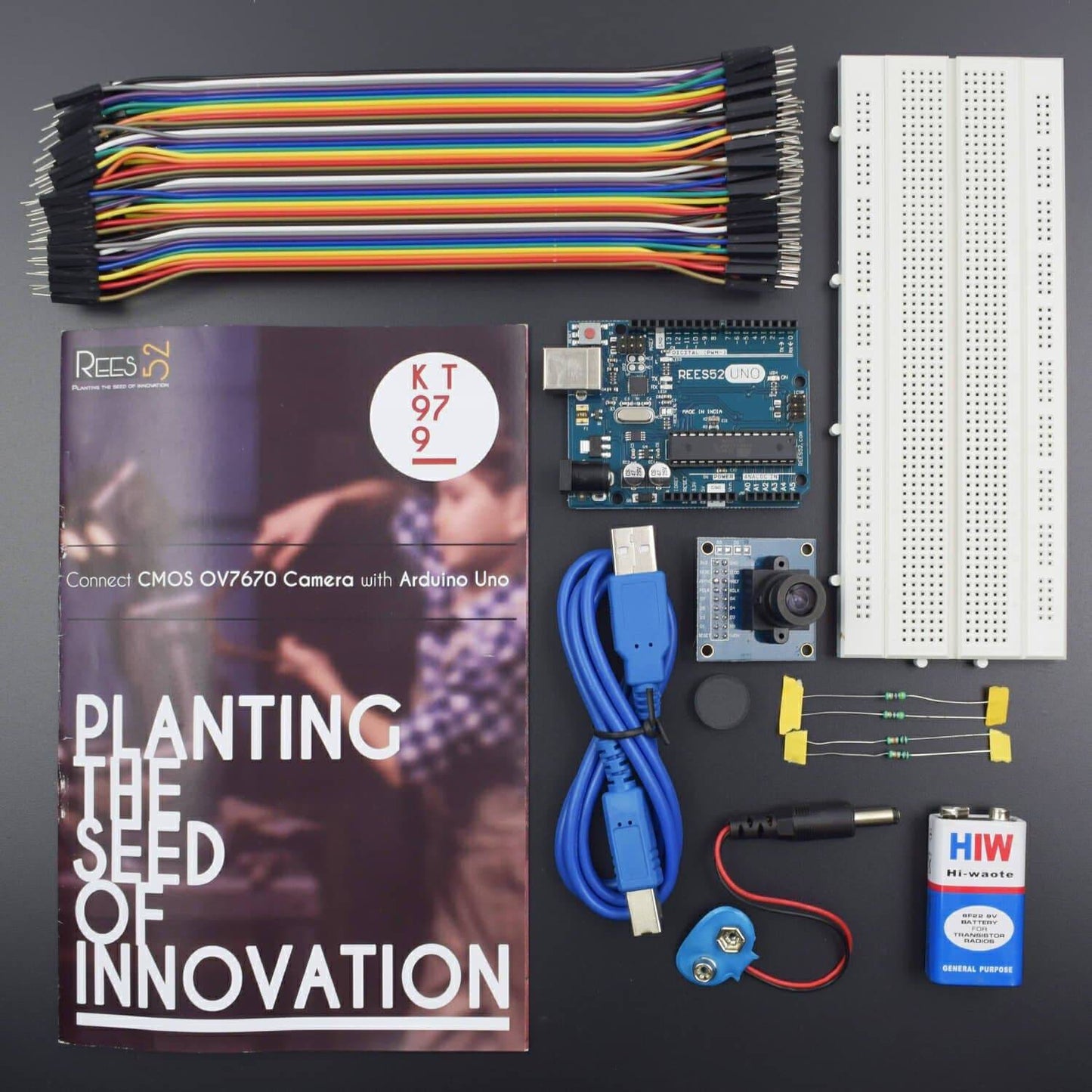
KIT INCLUDES:
- CMOS Ov7670 camera -1
- Arduino uno with USB Cable – 1
- Bread board 840 point - 1
- Jumper wire male to female- 40 pieces
- Jumper wire male to male- 40 pieces
- Resistance 10 k ohm- 2 piece
- Resistance 7 k ohm - 2 piece
The camera module is powered from a single +3.3V power supply. An external oscillator provide the clock source for camera module XCLK pin. With proper configuration to the camera internal registers via I2C bus, then the camera supply pixel clock (PCLK) and camera data back to the host with synchronize signal like HREF and VSYNC. The OV7670 camera module is a low cost 0.3 mega pixel CMOS color camera module, it can output 640x480 VGA resolution image at 30fps. The OV7670 camera module build in onboard LDO regulator only single 3.3V power needed and can be used in Arduino, STM32,Chipkit, ARM, DSP , FPGA and etc.
HARDWARE REQUIRED
- CMOS Ov7670 camera -1
- Arduino uno with USB Cable – 1
- Bread board 840 point - 1
- Jumper wire male to female- 40 pieces
- Jumper wire male to male- 40 pieces
- Resistance 10 k ohm- 2 piece
- Resistance 7 k ohm - 2 piece
SOFTWARE REQUIRED
Arduino IDE
Arduino IDE 1.8.5 (programmable platform for Arduino)
Click To Download:https://www.arduino.cc/en/Main/Software

Code
Click to see the code or copy the link.
https://drive.google.com/open?id=1jw0vFKKPVtBTvKHk42uYc0OuB1QG08xi
Output Software


.net 3.5 framework


SPECIFICATIONS
CMOS OV7670 Camera
- Array Element:640X480
- IO Voltage: 1.7V to 3.0V
- Power operation: 60mW/15fpsVGAYUV
- Sleep:<20μA
- Operating Temperature: -30 ℃ to 70 ℃
- Stable: 0 ℃ to 50 ℃
- Output Formats (8): YUV/YCbCr4: 2:2, RGB565/555, GRB4: 2:2, Raw RGB Data
- Lens size: 1/6 "
- Chief ray angle: 24 °
- Maximum image transfer rate: 30fps VGA
- Sensitivity: 1.3V / (Lux-sec)
- SNR: 40 dB
- Dynamic range: 52 dB
- Scan Mode: Progressive
- Electronic Exposure: 1 line to 510 line
- Pixel Size: 3.6μm x 3.6μm
- Dark current: 12 mV / s at 60 ℃
Features
- High sensitivity suitable for low light operation
- Low voltage suitable for embedded applications
- Standard SCCB interface compatible with I2C interface
- Supports VGA, CIF, and from a variety of sizes CIF to 40x30
- VarioPixel sub-sampling mode
- ISP has a compensation function to eliminate noise and dead pixels
- Support for image scaling
- Compensation for loss of optical lens
- 50/60Hz automatic detection
- Saturation automatically adjust (UV adjustment)
- Automatically adjust edge enhancement
- Automatically adjust the noise reduction
- Automatically affect the control functions include: automatic exposure control, automatic gain control, automatic white balance, automatic elimination of light stripes, automatic black level calibration image quality control including color saturation, hue, gamma, sharpness
PROCESS
CMOS OV7670 Camera


Step -1


Step-2
Download the following from the link description:
- Code.
- Output software.
- .net v3.5
Step -3
- Copy the code into your Arduino ide.
- Choose the com port from the board.
- Remember the com port.
- Upload your code.
Step -4
- Run the output software exe

Choose your com port --> click start
Probably something similar is what you would be seeing.


Troubleshooting
If not the exact image you expected, then you might want to trouble shoot,
Case 1: if you are not able to open the output software-
Check for the .net 3.5 installation.
Case 2. If you are having issues with viewing images or not responding software
Check for the wirings 9/10 people go wrong here.
Case
Simply adjust the screw of your camera lens and view different images till they seems to be clear
