


Adafruit
Adafruit Feather nRF52840 Express Bluetooth LE Development Board - IR0000551
Adafruit Feather nRF52840 Express Bluetooth LE Development Board - IR0000551
SKU:IR0000551
Earn an estimated 33 points on this order
Found a better price?
Send the competitor link and price to our team. No automatic price match.
Couldn't load pickup availability
- For Bulk Order Click Here
- Need Customer Support?
- Free Delivery Above 999/-
Note: In case you receive a damaged or faulty product, please return it in the original box with all foam and packaging. Returns will not be accepted if further damage occurs due to improper packing.
If you order a product that is currently in Preorder, and the price of that item increases in the future, you will be required to pay the difference in price.
For refund/return/replacement, call us at +91 95995 94520 or email us at support@rees52.com
Delivery Time
Delivery Time
- Delivery time with the Express Shipping option is 2-3 working days, and with the Standard Shipping option is 5-6 working days. It varies based on location, reliant on courier services.
- Delivery time if the order item is on Preorder Status is 20-25 days.
COD (Cash on Delivery)
COD (Cash on Delivery)
Cash on Delivery is currently unavailable for new orders
Existing COD Orders Only
- For COD you have to pay extra charges of Rs 350/- before the shipment. (We will share the company QR Code, UPI ID or Account details for the same)
The REES52 Promise
The REES52 Promise
We want you to build, not worry. Here is exactly what happens if something goes wrong with your order.
Dead on arrival or defective? We replace it.
If your item is dead on arrival or has a manufacturing defect, tell us within 7 days of delivery. Email support@rees52.com with your order number and a short video or a couple of photos showing the problem. Our team will get back to you within 24 hours and arrange a free pickup from your doorstep - you never pay return shipping for a defective item. Once we verify the issue, your replacement ships out right away. If the item is out of stock, you get a full refund instead.
Refunds, with real timelines.
- Approved refunds go back to your original payment method within 6-7 working days.
- Missing item in your package? Tell us within 7 days with photos of what arrived and the parcel label. Once confirmed, the refund for the missing item reaches you in 2-3 working days - or we ship the missing piece free, your choice.
- Every refund comes with a reference number by email or WhatsApp, so you can track it with your bank instead of chasing us.
Wrong item or not as described?
Email us your order number and a photo of what you received. We arrange the return pickup, and ship the correct item as soon as the return is on its way. Prefer your money back instead? That is fine too - full refund, same 6-7 working day timeline.
About lead times on some products.
A few items on rees52.com are sourced from our overseas partner warehouses and are not sitting on our shelf. Those products show a lead time of about 20-25 working days on the product page, before you pay. If you order one, we keep you posted as it moves. Changed your mind while waiting? You can cancel any time before dispatch and get a full refund within 6-7 working days. No cancellation fee, no questions.
Talk to a human.
Email support@rees52.com or call/WhatsApp +91 95995 94520, Monday to Saturday, 10:30 AM to 7:00 PM. Real people, order number in hand, actual answers.


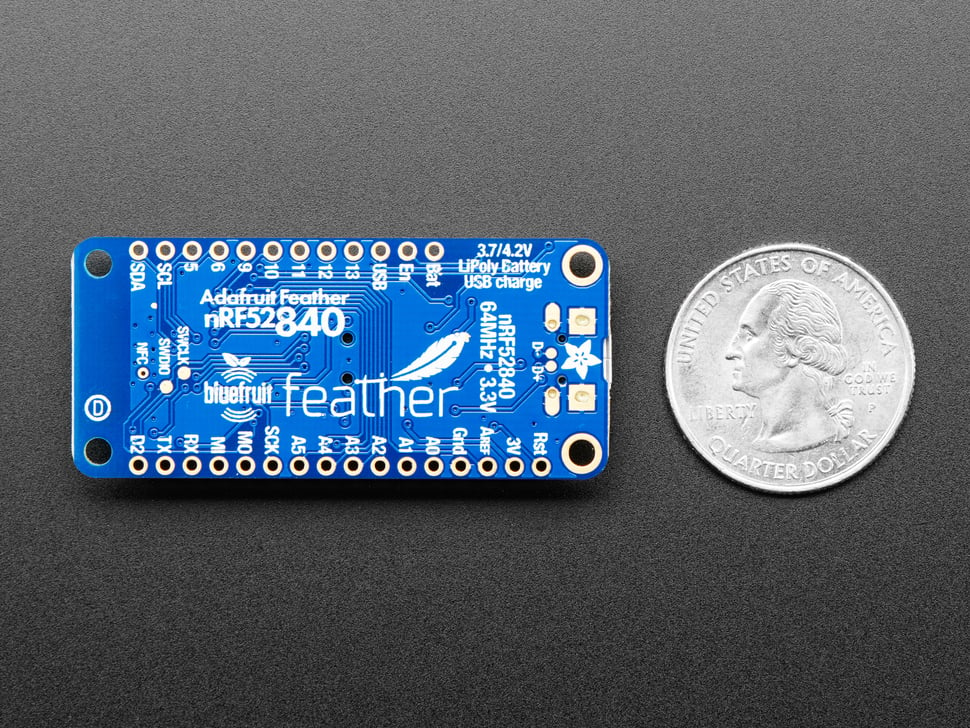
Bluetooth LE and native USB in the Feather format
The Adafruit Feather nRF52840 Express combines a Nordic nRF52840 microcontroller, Bluetooth Low Energy radio and native USB on a compact development board. It suits wireless sensor prototypes, portable controllers, BLE peripherals and USB input devices. Program it with the Adafruit Arduino core or CircuitPython, then use the onboard buttons and NeoPixel for user input and status feedback.
A 64MHz Arm Cortex-M4F processor provides 1MB internal flash and 256KB SRAM. A separate 2MB QSPI flash stores CircuitPython files. Native USB supports a UF2 bootloader and application-dependent USB functions such as serial, HID and MIDI, without a separate USB-to-serial converter.
Features
- Nordic nRF52840 with a 64MHz Cortex-M4F processor and hardware floating-point support.
- 1MB internal flash, 256KB SRAM and 2MB external QSPI flash.
- Bluetooth Low Energy 2.4GHz radio through the onboard module.
- 21 GPIO, six analog inputs and up to 12 PWM outputs.
- SPI, UART, I2C and I2S peripherals for project expansion.
- Micro USB connection for programming and power, plus a JST PH socket and onboard charger for a compatible optional 3.7V LiPo battery.
- Reset and user/DFU buttons, status LEDs, an RGB NeoPixel and a populated 2 x 5, 0.05-inch SWD connector.
- Feather form factor, approximately 51 x 23 x 7.2mm without edge headers soldered in.
Power and connection notes
This is a 3.3V-logic board. Use the official pin reference before connecting external hardware. The 3V pin is the onboard regulator output; BAT follows the optional battery supply; USB follows the USB power rail. Pulling EN low disables the 3.3V regulator output. A battery is optional when the board is powered over USB.
I2C requires external pullup resistors, which are not fitted on this Feather by default. Many sensor breakouts already include them. The D2/NFC2 pin is configured for GPIO by default; changing the board to NFC use requires a full erase and bootloader recovery using suitable SWD equipment. The included functional-reference illustration explains signal groups, not physical pin positions.
Getting started
Use a data-capable Micro USB cable and follow the official guide to install the Adafruit nRF52 Arduino board support or CircuitPython firmware. Start with a USB or LED example before connecting sensors, then test BLE using the guide's examples and a compatible phone or computer. Keep the antenna area clear of metal and wiring where practical.
Package Includes
- 1 x Adafruit Feather nRF52840 Express development board.
The supplier's package list specifies the board only. Header strips and any scale-reference coin visible in photographs are not included in this listing. LiPo battery, Micro USB cable, breadboard, programmer, FeatherWings and other accessories are not included.
Useful Links
- Official Adafruit product page
- Official nRF52840 Feather guide and setup instructions
- Power, pins and interface reference
- Hardware files, schematics and downloads
- Supplier reference and package list, Robu 1104418
Image credits: native product photographs by Adafruit Industries, used and re-hosted under the online-store content-use permission in the Adafruit Products API rules. The functional pin reference is an original REES52 illustration based on official documentation. No Learn guide photographs or diagrams are reproduced.